Microtech PCD-47B User Manual Page 10

  • Download
  • Add to my manuals
  • Print
  • Page
    / 21
  • Table of contents
  • BOOKMARKS
  • Rated. / 5. Based on customer reviews
Page view 9
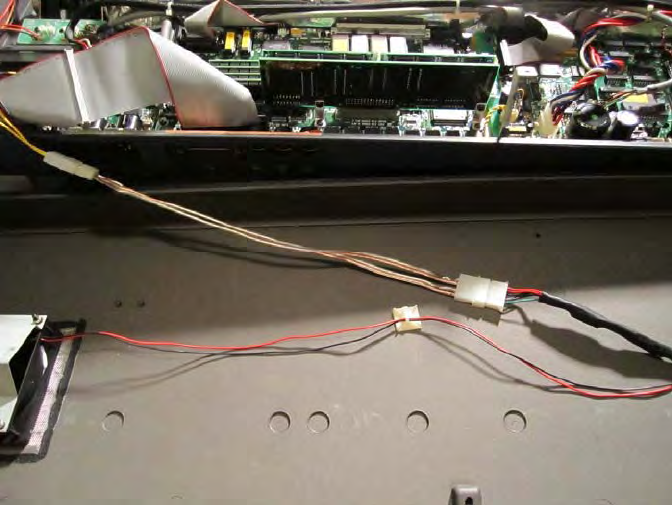
Power
InstallthepowercableextenderbetweenYcableandHDDpowerconnectoronthefanharness.Mineismadefrom
someleftoversmallgaugespeakerwire.InsertthecableharnessbackintoJ18.IfyourK2000didnothaveafankit,
thenyouwillneedtomakeacablethatgoesfromJ18tothedrivebay.Ir
e
commendusingtheoldfloppypowercable
astheboardconnectoristhesameforJ18only+5visneededfortheCFreaderandthebridge.CliptheFDD
connector,addwiretothelengthandterminatewithaHDDpowerconnector.Alternately,youcancutthere
ceptacle
and+12VwireoffofanHDDextendercableandjointhetwocablestogether.
Atthispoint,beforeyouapplypowertoyourK2000,you’llfirstwanttocheckthatyoumadeyourconnections
correctly,thatnothingisshortedoropenandthateverything
issecurealwayscheckanddoublecheckbefore
applyingpower!
Youcanalsoreinstalltheblackplatefromthefloppydrive.Thisblackplatefillstheslightgapbetweenthebottomof
thebayandthedrive.Reinstalltheblackplateasitwasonthefloppydrivether
eisalittleridgeonthebayopening
thatactsasasto
pfortheplate.Theplatewillstickoutafewmillimetersfromthefrontofthedrive.Sincethereare
noboltholesintheCFdrive,usedoublesidedtapetosecureittothebottomoftheCFdrivewheretheboltswere.
Sorry,Iforgottotakeapictureofthis,butyoucanseetheplateonthefloppydrivepictureatthebeginningofthe
gui
de.
Youmaynowputthebottomcoverbackonthesynth(donotputtheboltsbackinuntilaftertesting).Makesureyo
u
aren’t
pinchinganycables.Flipthekeyboardsoyoucanseethedisplay.
Page view 9
1 2 ... 5 6 7 8 9 10 11 12 13 14 15 ... 20 21

Comments to this Manuals

No comments